Adding collections
Collections make it easy to organize related resources within your space. Collections help members find valuable content in one place.

How to use Collections
1. Create a Collection
2. Choose whether members can contribute
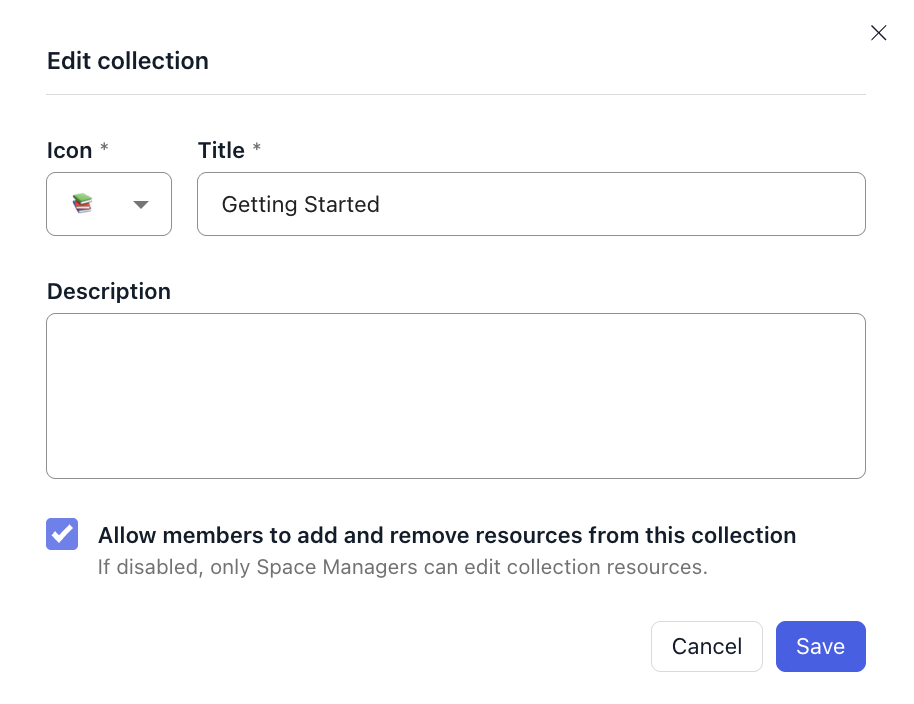
Each collection has a setting that controls whether members can add, remove, and reorder the resources inside it. Turn it on for collections you want the space to build together; leave it off for collections you want to curate yourself.
3.Add Resources to a Collection
Resources can be added to collections via the options menu in (1) the resource viewer for a specific resource, or (2) in the collection view.

4. Reorder Collections
Arrange collections on the Resources tab to highlight priority content.

5. Reorder Resources within a Collection
Arrange resources within a collection to prioritize the most important content, or guide members through the resources in sequence.

5. Group resources into categories
For larger collections, group resources into named categories so members can scan rather than scroll. A resource can belong to more than one category, and both categories and the resources inside them can be reordered at any time. See Collections for details.
6. Edit or Delete a Collection
Space Managers can modify a collection's title, description, or contents anytime. Deleting a collection doesn't remove its resources from the space.

Search results
Members will see that a resource is part of a collection when viewing that resource on the search results page. Clicking on the collection will navigate members to that collection page where they can view all resources within the collection.
FAQs
Who can create, edit, and delete collections?
Only Space Managers.
Who can add and remove resources in a collection?
Space Managers always can. Members can too, if the collection has member contribution turned on — a per-collection setting Space Managers control. When it's on, members can add, remove, and reorder resources within that collection.
Does deleting a collection delete its resources?
No. The resources stay in your space's resource library.
Use Cases for Collections
Training Modules
Group training materials, such as Certification or Rapid Rehousing guides.
Knowledge Base Categories
Organize announcements, such as Product Updates or Feature Rollouts.
Topic-Based Resources
Curate content around key topics, such as Awards 2024, Cybersecurity, or Homeless Management Information Systems (HMIS).
Onboarding
Simplify the onboarding process, such as Getting Started Guides or New Member FAQs.
Sequential Events
Keep track of recurring updates, such as Meeting Minutes or Weekly Email Summaries.
Collections make your space content more organized and easier to navigate. As a Space Manager, you can use them to guide members to relevant information and boost engagement across your platform.