July 2026 Release Notes
Features, enhancements, and fixes released by Civic Roundtable in July 2026.
Highlights
Speaker attribution in meeting transcripts
Video meeting transcripts now label who said what, turning a recording into a searchable record of the conversation.
Self-service connected websites
Space Managers can now make trusted external websites searchable in Roundtable themselves, with no support request required.
Track who changed what and when in a Roundtable document, and roll back to any earlier version.
Microsoft Word document import
Turn the Word files you already have into collaborative Roundtable documents, without retyping or reformatting.
Speaker attribution in meeting transcripts
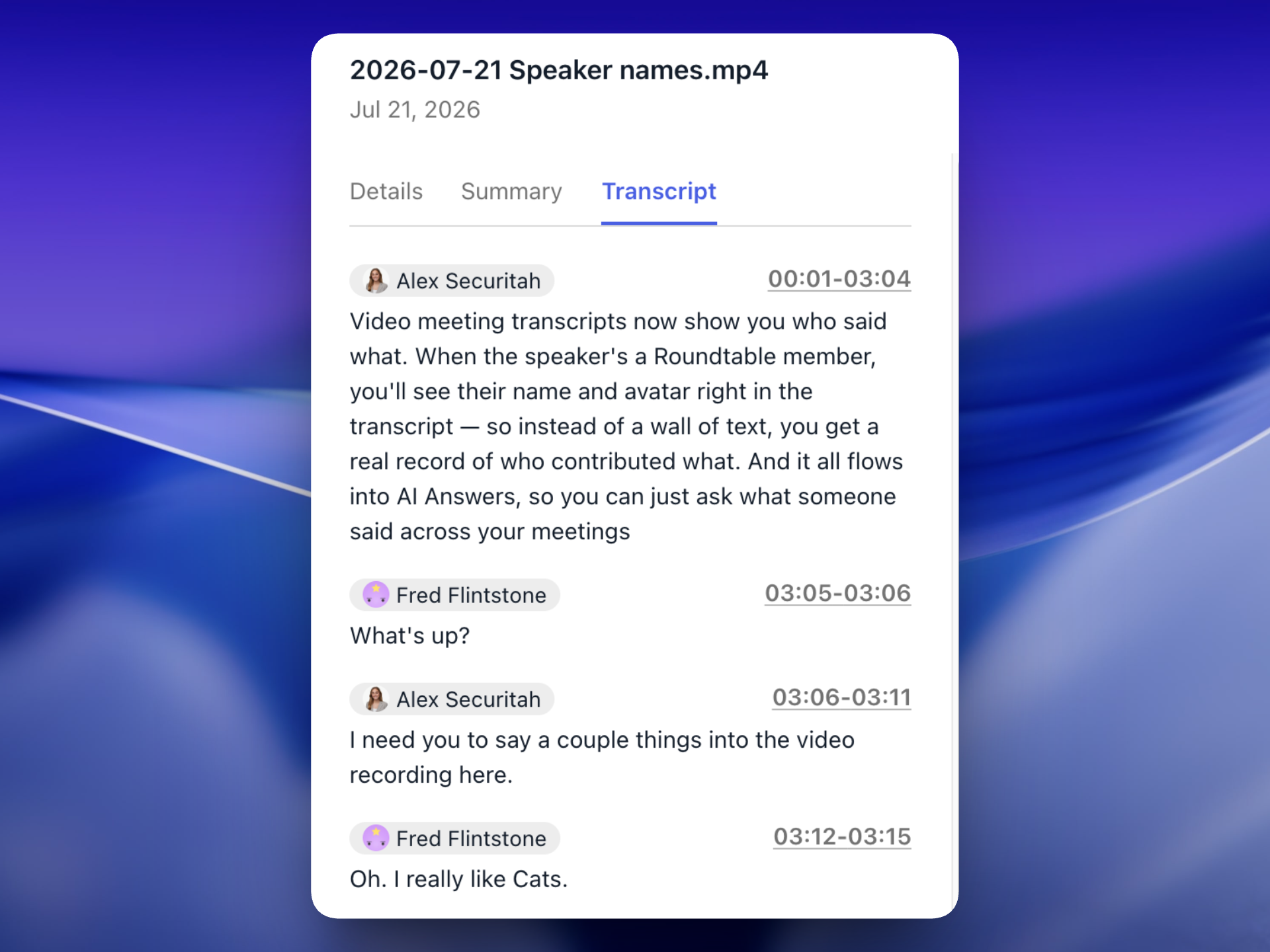
Transcripts from recorded Roundtable video meetings now identify each speaker. When the speaker is a known Roundtable member, the transcript @mentions them alongside their contribution.
Transcripts are available in the resource viewer's "transcript" tab, and flow into search and AI Answers, so you can ask what a particular person said across meetings and get an answer grounded in the actual record.
Self-service connected websites
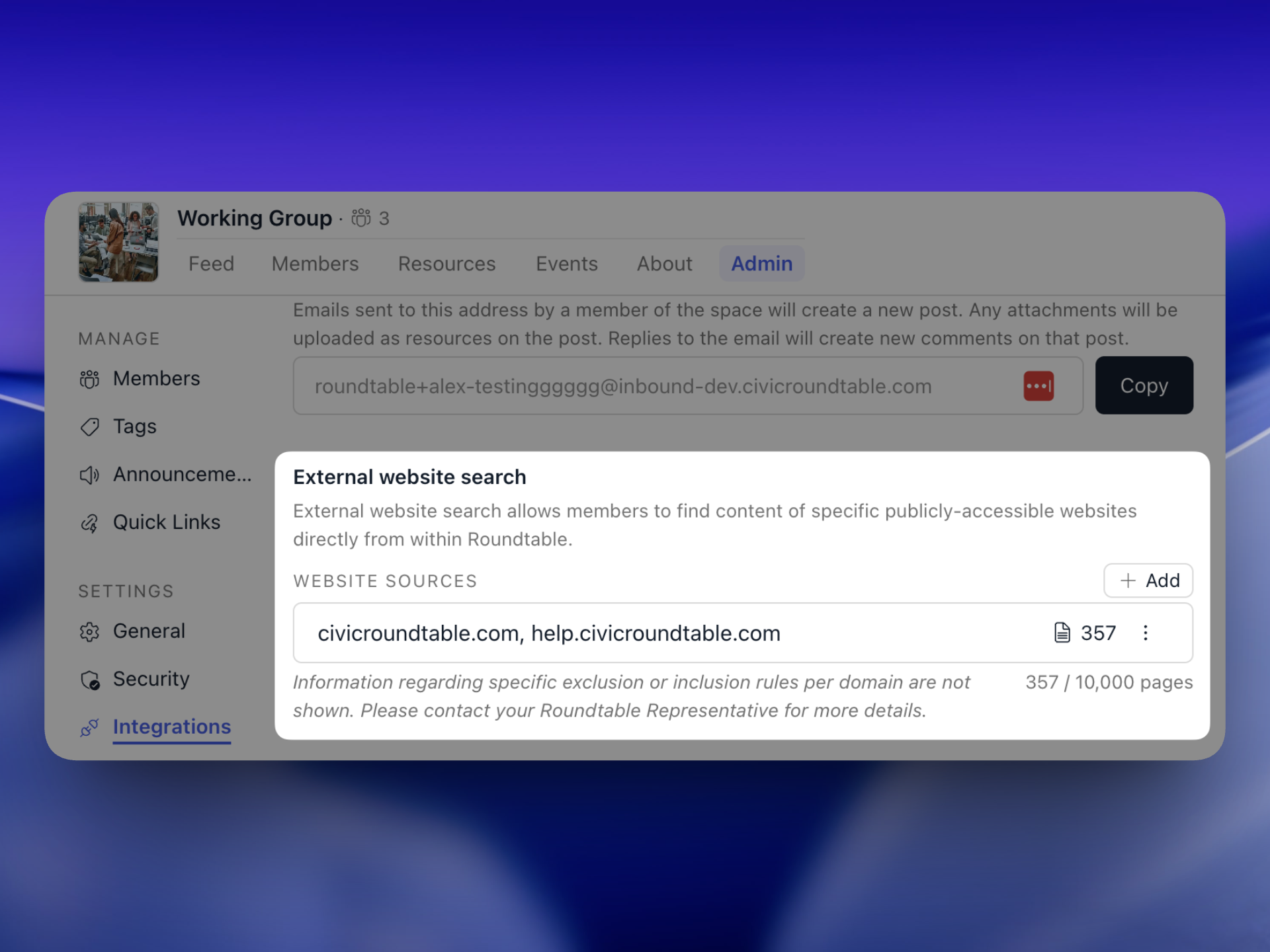
External Website Search lets members find content from specific publicly accessible websites — an agency site, a resource library, a program homepage — directly in Roundtable search and AI Answers. Previously, setting one up required a request to Roundtable support. Space Managers can now do it themselves from space admin.
- Self-service setup: add any publicly accessible website in-product and make it searchable in Roundtable and available to AI Answers, with no additional setup step.
- Connected pages view: see every indexed page for a connected website, so you know exactly what will show up in search and AI Answers. There's a limit of 10,000 pages per space.
- Quick Link and external resource integration: when adding a Quick Link or an external resource link, you can add that site to External Website Search in the same flow.
Document version history
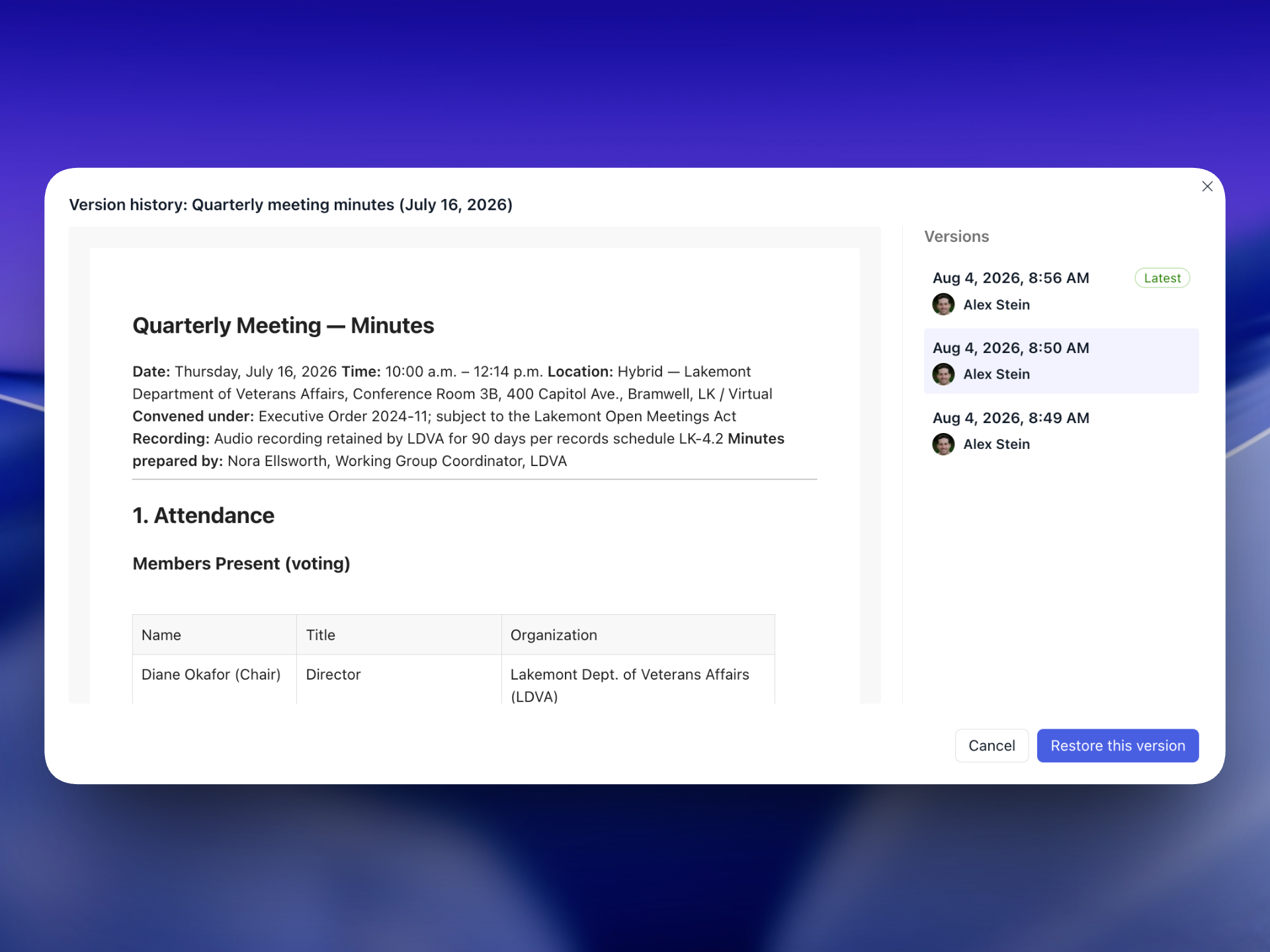
Roundtable documents now keep a running history of your work, so you can see how a draft got to where it is and undo a change you didn't want.
- Automatic snapshots are saved as you and your collaborators work.
- A version sidebar lists each version with its timestamp and author, and marks the current one.
- Read-only previews let you open any earlier version without affecting the live document.
- Restore returns the document to any previous version.
This is especially useful for the kind of shared, cross-organization drafting that Roundtable documents was built for: when several partners are editing the same memo or set of meeting minutes, version history makes it clear who contributed what, and removes the risk that a well-meaning edit quietly overwrites someone else's work. Version history is available to document Editors and Owners; Commenters and Viewers won’t see it.
Microsoft Word document import
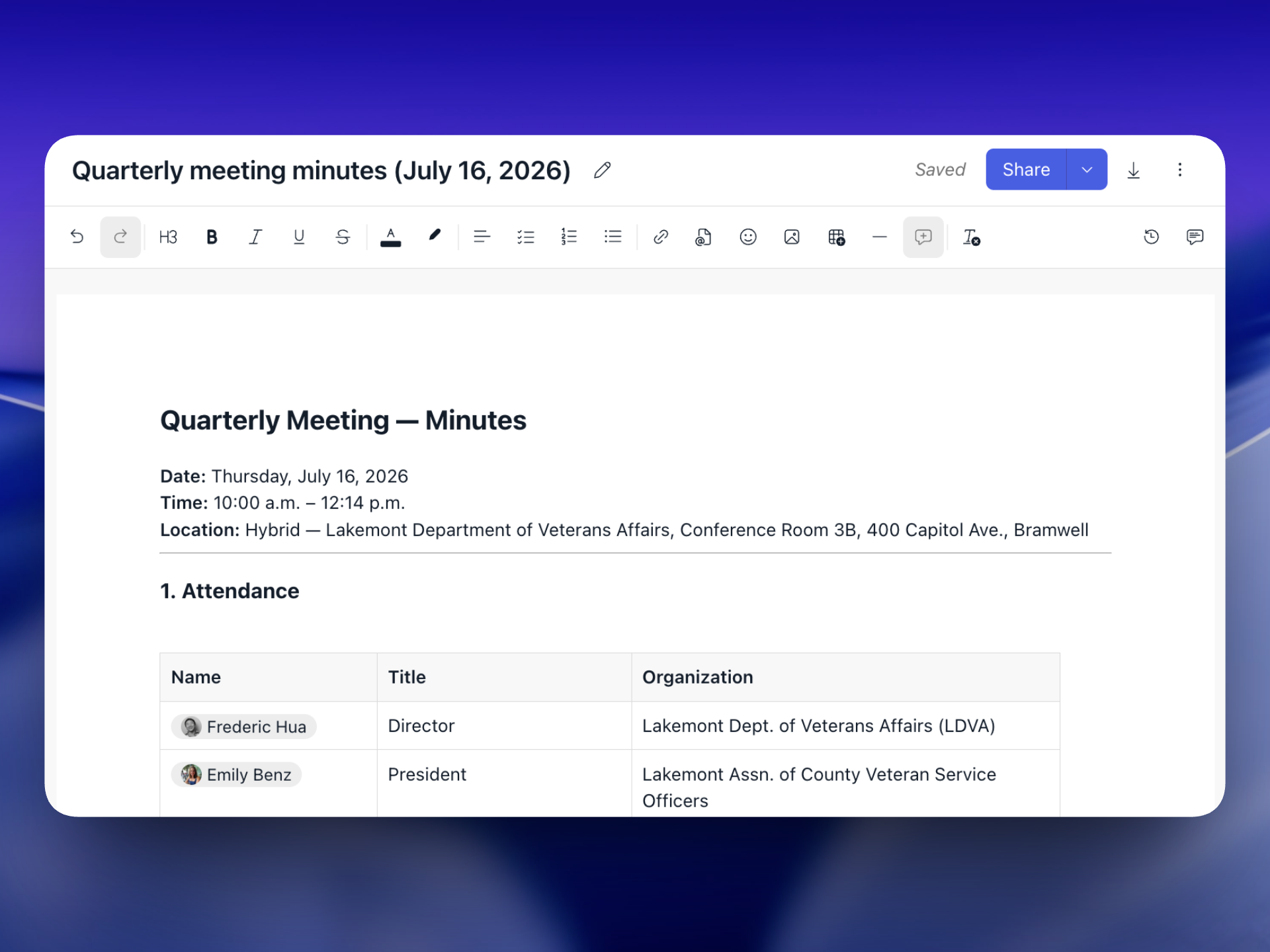
You can now create a Roundtable document by importing a Microsoft Word file. Most teams already have a backlog of work living in .docx files — meeting minutes, memos, policy drafts — sitting in shared drives or buried in email attachments. Import removes the "start from scratch" barrier: bring what you already have straight into Roundtable and it immediately gains cross-organization access, real-time collaboration, and connections to the meetings, resources, and discussions around it.
Enhancements
Improvements to the platform that make it more powerful and easier-to-use.
- [📊 Analytics] You can now jump to a member's profile directly from video meeting attendee analytics.
- [📄 Documents] Document tags are now displayed in the document.
- [📝 Forms] Form views by members are now tracked and shown in the form's Respondents tab.
- [📝 Forms] Forms can now be duplicated.
- [📝 Forms] Form questions can now be copied, making form creation faster.
- [📝 Forms] Forms support a new "Rating scale" question type, which captures responses as structured numeric data rather than text labels.
- [📝 Forms] Single-select and multi-select questions can now be configured to display as dropdowns.
- [📝 Forms] Forms now support a "Collect respondent organization" setting, which captures the responding organization as part of the submission.
- [📝 Forms] The text on a form's confirmation page can now be customized.
- [📝 Forms] Forms can now be published when they only collect name and email or organization fields.
- [📝 Forms] Form settings toggles now update immediately.
- [📝 Forms] Form titles for non-public forms now appear in the browser tab title.
- [📝 Forms] The Respondents tab now appears on all published forms.
- [📝 Forms] The Respondents tab is now sorted by most recent submission by default.
- [📝 Forms] The Respondents tab can now be searched by name.
- [📝 Forms] The "My responses" and “Respondents” tables now show a "last submitted" timestamp rather than "date submitted”.
- [📝 Forms] Full response text is now shown in Submissions → Grouped.
- [📝 Forms] Respondent popovers are now shown in form submissions.
- [📝 Forms] File uploads in the grouped submission view can now be paginated.
- [📝 Forms] Members added as form collaborators can now optionally be notified.
- [📝 Forms] You can now notify members of a space added to a form's audience even after the form has been published.
- [📝 Forms] Form response invitation emails now display the space logo and name.
- [🧑🤝🧑 Member mgmt] Space Viewers can no longer open the Members tab, view member profiles, or start direct messages.
- [🔔 Notifications] Membership request emails to Space Managers are now batched.
- [🤖 Performance] Leaving a space is now about 50% faster.
- [🤖 Performance] Comments with more than ten attached resources now load faster.
- [📰 Posts] Links to Roundtable entities now automatically convert to @mentions.
- [📰 Posts] Posts can now show up to five link previews.
- [📇 Profiles] Project attachments on member profiles now look and behave like file uploads everywhere else in the product.
- [📚 Resources] Microsoft Office files now preview in more places.
- [📚 Resources] PDFs with an auto-print script embedded in them no longer trigger the print dialog when previewed.
Fixes
Issues addressed to improve the product experience.
- [✨ AI] When a Space Manager renames or deletes a tag, AI Answers now uses the updated tag going forward.
- [📄 Documents] A document's "last modified" timestamp no longer updates when someone only opens it.
- [📄 Documents] Table columns no longer resize unexpectedly as new columns are added to a large table.
- [📄 Documents] Copying content from rich text inputs and AI Answers into a document now preserves @mentions.
- [📄 Documents] Pressing Tab now inserts a tab character instead of moving focus out of the document.
- [📅 Events] Editing a recurring event's end time so that it crosses midnight, and applying the change to the whole series, no longer saves the end time a day early.
- [📅 Events] Changing the end date of a recurring event now takes effect when the change is applied to all events.
- [📅 Events] All-day recurring events that repeat weekly, monthly, or yearly no longer have an off-by-one-day error.
- [📅 Events] Fixed a timezone issue that corrupted end dates on all-day recurring events when they were edited.
- [📅 Events] Editing the attachment on a single occurrence of a recurring event now offers the "this event" scope.
- [📝 Forms] Duplicate options within a single-select or multi-select question are now prevented.
- [📝 Forms] Form questions no longer reserve empty space for a description that isn't there.
- [📝 Forms] The form description field no longer shows an extra divider line beneath the toolbar.
- [📝 Forms] Form collaborators who aren't the owner no longer see the delete option.
- [📝 Forms] File uploads submitted through a form are now included in the form export zip.
- [📝 Forms] Creating your first form from the empty view now takes you straight into the form builder.
- [🧑🤝🧑 Member mgmt] Inviting someone who doesn't have an account yet to additional spaces now shows their email address in the invitation modal.
- [📰 Posts] Posts created from inbound emails sent by older email clients are now editable.
- [📰 Posts] Reaction modals no longer scroll prematurely when a member's job title wraps onto more than one line.
- [📚 Resources] Empty resource descriptions are no longer displayed.
- [🔍 Search] Quick search no longer jumps to the matching results tab when the current page URL happens to end in a tab name.
- [🔍 Search] Quick search no longer errors after the browser window is resized repeatedly.
- [⚙️ Space Admin] The tag usage dialog no longer duplicates its table header.
- [⚙️ Space Admin] Spaces whose name ends in a space character no longer cause an error.