October 2026 Release Notes
Features, enhancements, and fixes released by Civic Roundtable in October 2026.
Highlights
Event creators can now add a registration form directly to an event, and members can register wherever they find it.
Date and time questions in Forms
Forms has a new Date/time question type, built for collecting availability and scheduling answers without free-text guesswork.
Roundtable forms can now be embedded on external websites and receive submissions from there.
@mention Roundtable context in AI Answers
Type @ in AI Answers to point it at the exact resource, document, or meeting notes you want it to work from.
Event registrations
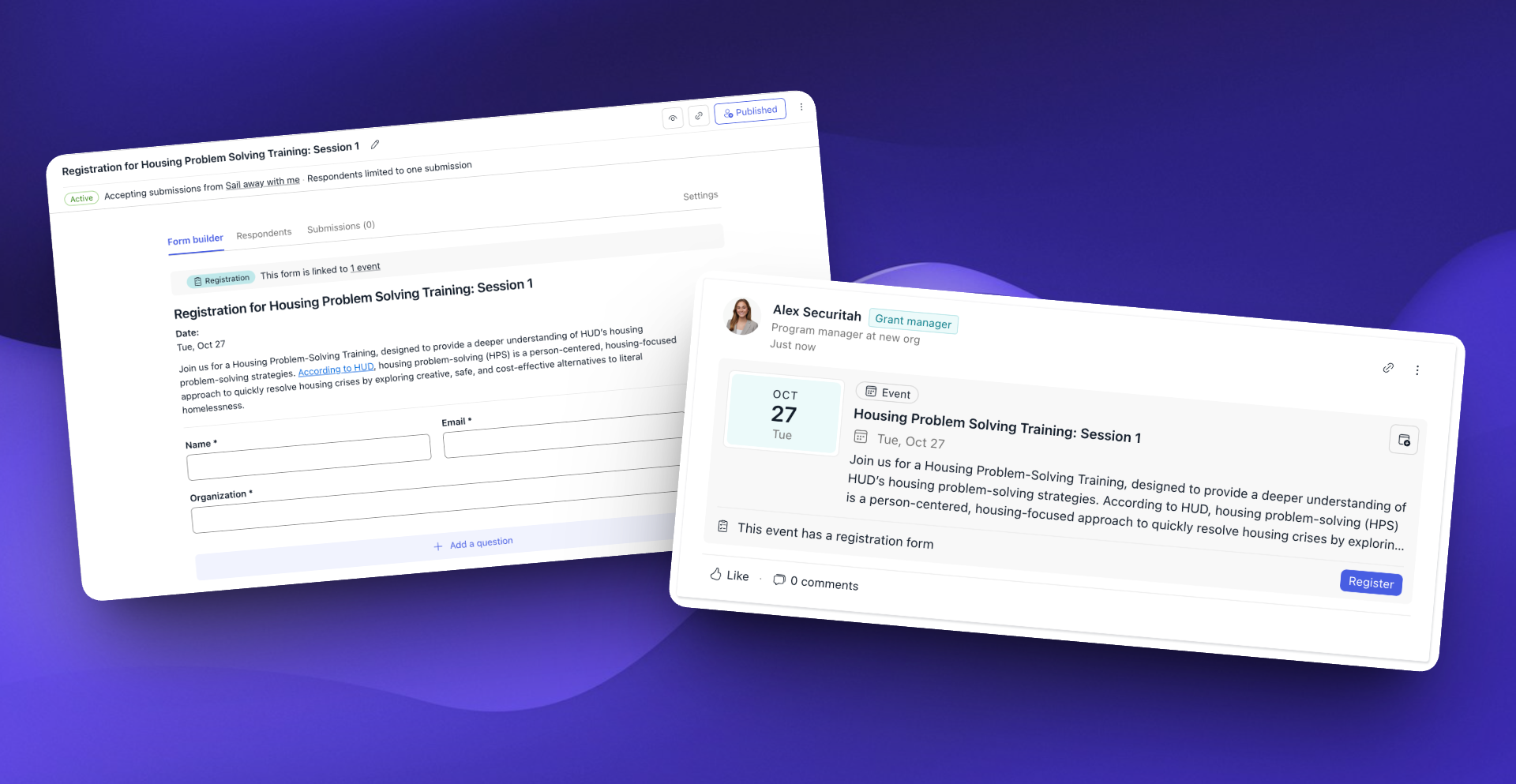
Many Roundtable events link out to a registration form hosted somewhere else, forcing members to leave the event to sign up. Event creators can now add registration directly to an event:
- Create a registration form that Roundtable pre-fills with the event's details and shares with the event's space. Edit it like any other form.
- Link an existing form, or paste a sign-up link from another tool, like a ticketing or webinar platform.
- Register anywhere the event appears: the event page, events list, popover, and feed post all show a Register button, which becomes a View button once someone has registered.
- Manage responses in Forms: registrations land in the Submissions tab, where you can export them and limit each person to one response.
Date and time questions in Forms
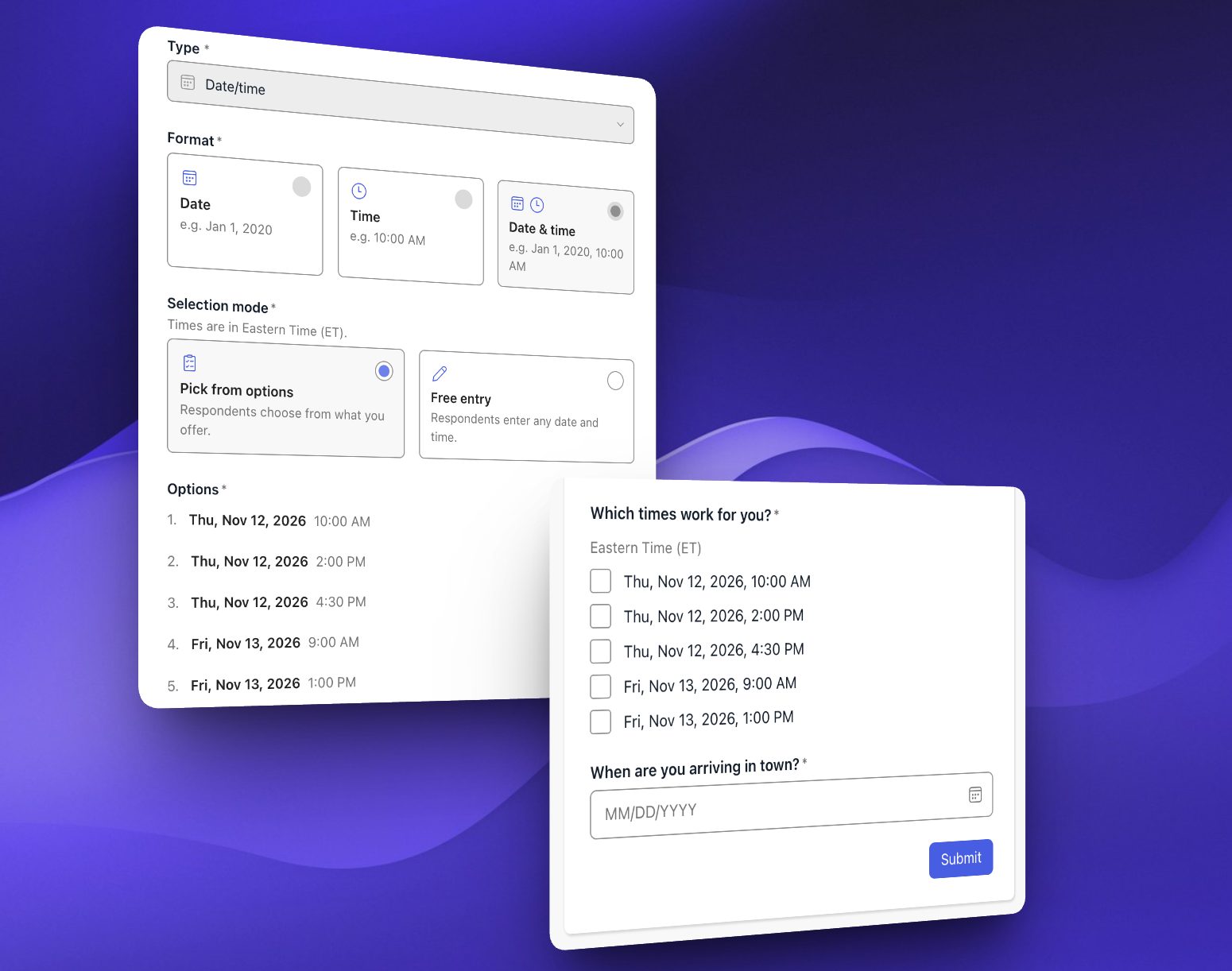
Forms previously had no dedicated way to collect a date or time, so availability and scheduling answers came back as inconsistent free text. The new Date/time question type fixes that:
- Choose a format: date, time, or date and time.
- Let respondents pick or choose: they enter their own date or time through a picker, or select from options you set up in advance.
- Built for availability: add dates with their own lists of times, so each combination is a checkbox and answers can be tallied like any other question.
- Timezones shown in the builder, respondent view, and submissions.
Embeddable forms
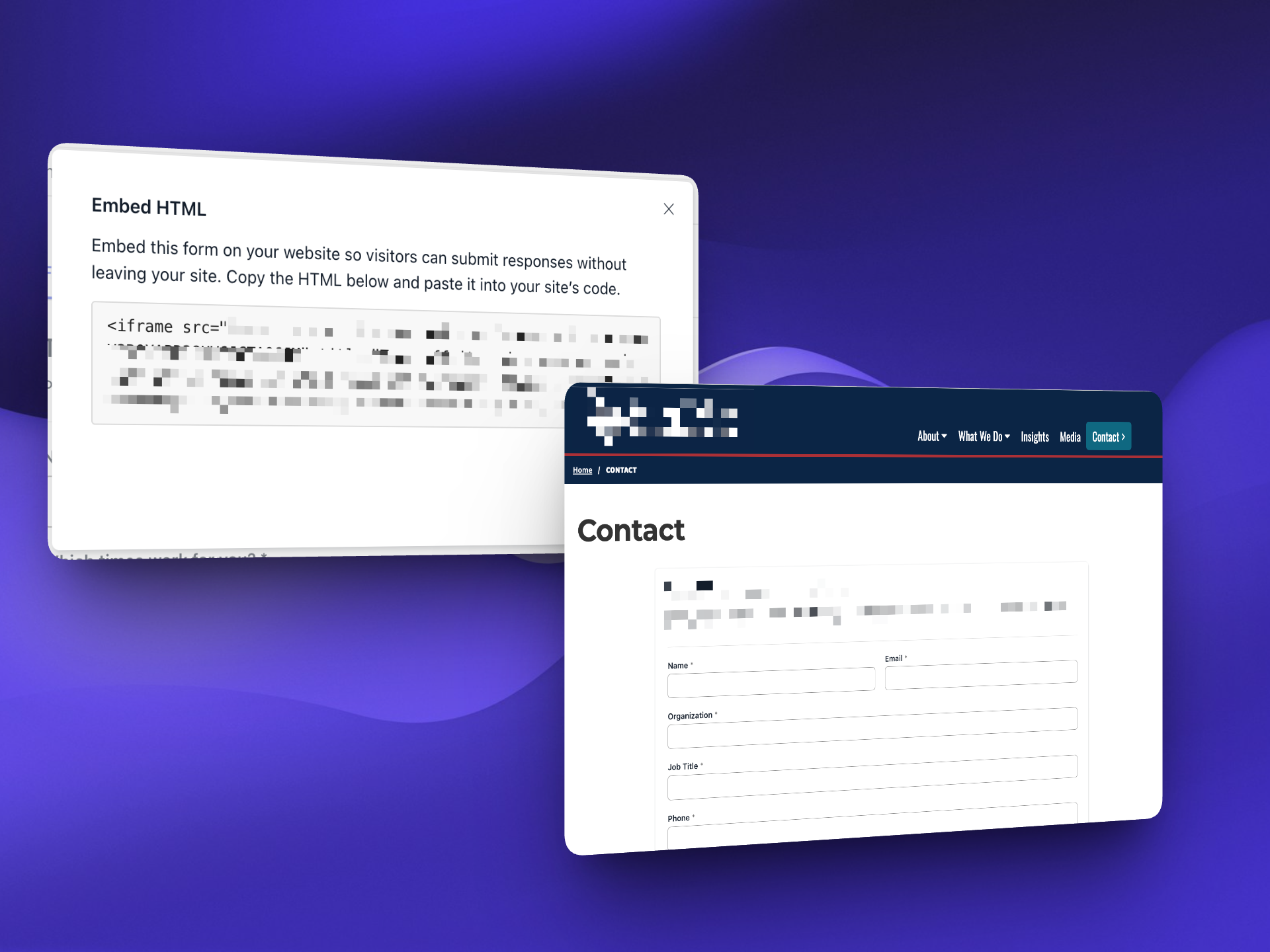
Previously, file upload questions were only available in forms shared with specific members or spaces — forms containing a file upload question couldn't be made public. Now, public forms can accept file uploads too, making it easy to collect applications, supporting documentation, photos, and more from anyone, whether or not they have a Roundtable account.
@mention Roundtable context in AI Answers
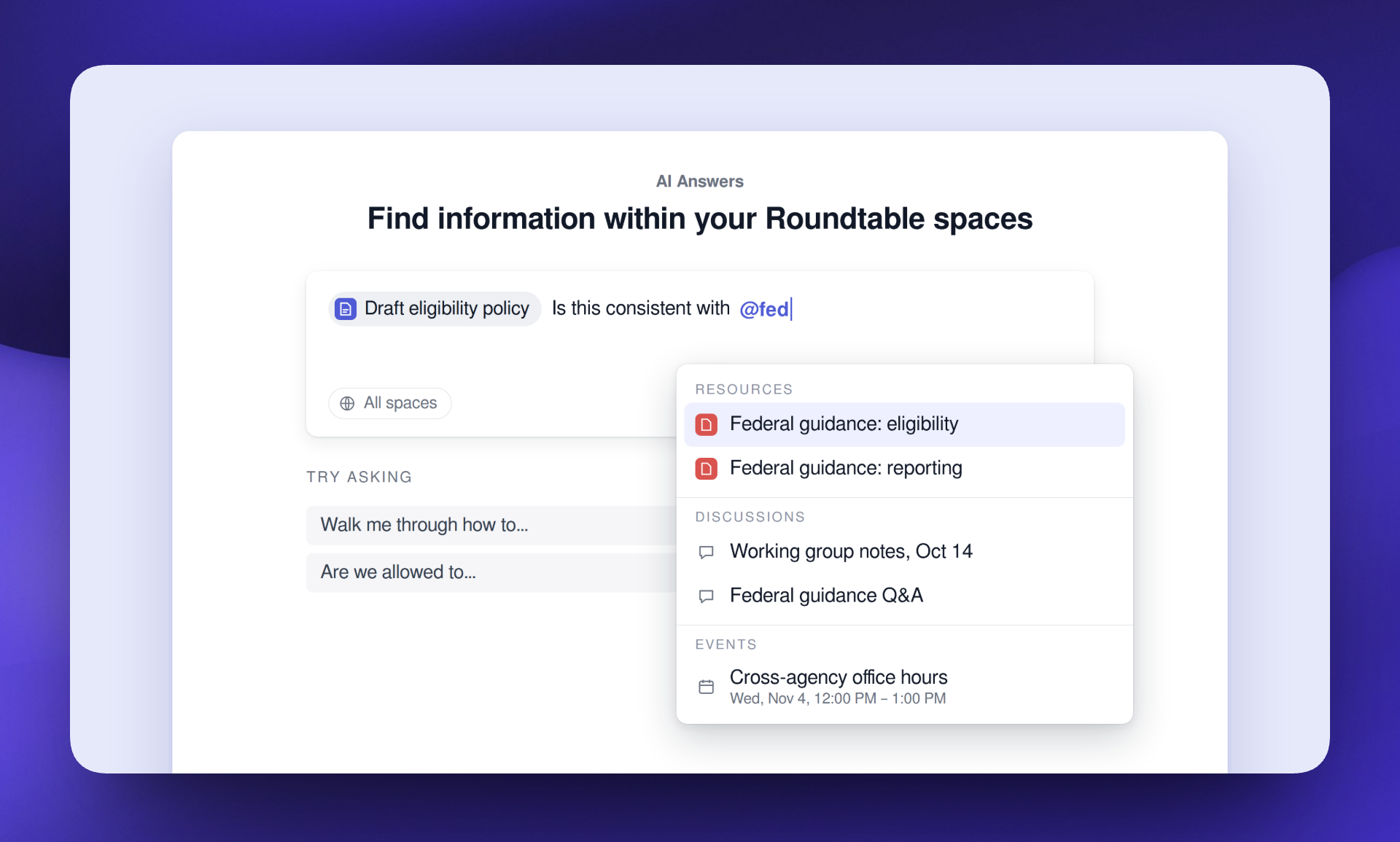
When you know exactly what you want AI Answers to work from, you can now point it there. Type @ in the AI Answers input to add a resource, document, or meeting notes to the thread's context, so answers are grounded in what you chose, on top of what AI Answers retrieves automatically. It uses the same picker as @mentions in posts and documents, works across spaces, and only surfaces content you already have access to.
Enhancements
Improvements to the platform that make it more powerful and easier-to-use.
- [✨ AI] Forms are now available in AI Answers. AI Answers has access to the title, owner, description, and status (active or closed) of published, non-public forms.
- [✨ AI] AI Answers citations now appear faster.
- [✨ AI] Creating a post from AI Answers now automatically selects the spaces used in the space filter.
- [✨ AI] AI Answers examples are updated.
- [✨ AI] The quick search call-to-action now auto-submits your AI Answers query on click for members in multiple spaces.
- [✨ AI] AI resource summary feedback options are now separated from the summary content.
- [✨ AI] Video transcripts now display an AI disclaimer at the bottom.
- [📊 Analytics] External resource link clicks are now tracked and included in space-level analytics.
- [📋 CRM] Create an email to all members of an organization from the organization's People tab.
- [📋 CRM] CRM emails that fail to send now allow resending.
- [📋 CRM] Existing CRM senders can now be edited.
- [📋 CRM] CRM email attachments can now be previewed before sending.
- [📋 CRM] Single-select and multi-select custom fields with five or fewer options now display as radio buttons or checkboxes instead of a dropdown.
- [📋 CRM] The CRM People tab now has a more inviting, action-oriented empty state when no people have been added yet.
- [📋 CRM] A "Date added" field is now included in CRM CSV exports.
- [📋 CRM] Deleting an unverified CRM domain now shows more accurate copy.
- [📋 CRM] CRM list headers now collapse extra whitespace when a list has no description.
- [📄 Documents] Images can now be added to documents by dragging and dropping them into the editor.
- [📄 Documents] The Documents empty state now includes an option to import a Word document.
- [📄 Documents] Creating a document from the Documents page empty state now opens the document editor.
- [📄 Documents] Sharing an untitled document now prompts you to edit the title.
- [📄 Documents] Document titles can now be edited by clicking the title.
- [📄 Documents] Documents shared with view- or comment-only access now have an easier-to-use header.
- [📄 Documents] Meeting notes links displayed in Documents are now sorted in chronological order.
- [📄 Documents] The document comments sidebar is now hidden at a more reasonable width.
- [📄 Documents] Clicking a document comment when the sidebar is hidden now opens the sidebar.
- [📄 Documents] A confirmation toast is now displayed when restoring a document version.
- [📄 Documents] Empty state cards in Documents and Forms no longer have borders that made them look interactive.
- [📅 Events] End time now shifts automatically when the start time is changed, maintaining the original event duration.
- [📅 Events] Event thumbnails are now more consistent.
- [📅 Events] Homepage upcoming events now show event cover images.
- [📅 Events] Events created via posts now link to the post from the event detail page.
- [📅 Events] Dates are now displayed in meeting notes titles for recurring event overrides.
- [📝 Forms] Form titles can now be edited by clicking the title.
- [📝 Forms] Published forms now require either collecting respondent info or at least one question.
- [📝 Forms] Form submissions that only collect name and email now display those fields in the submission view.
- [🧑🤝🧑 Member mgmt] Members creating an account are now greeted with confetti on the homepage.
- [🧑🤝🧑 Member mgmt] Space invite links now display a QR code section for easy sharing.
- [🧑🤝🧑 Member mgmt] Members can now be removed from an active space via the global member sidebar.
- [🧑🤝🧑 Member mgmt] Membership statuses are now displayed in categories in the "status" filter on the space-level members page.
- [🧑🤝🧑 Member mgmt] The "Invite via email" button is renamed to "Invite members" for Space Managers.
- [🧑🤝🧑 Member mgmt] The last Space Manager in a space can no longer leave the space or demote themselves to Member or Viewer.
- [💬 Messages] Messages now has an improved empty state.
- [🧭 Navigation] Navigation between spaces and the CRM is now seamless. The top navigation bar is now shared with the CRM, and if you're in multiple CRMs, you can toggle between them from the CRM side-nav.
- [🧭 Navigation] You can now search through your existing spaces and CRM lists in the side navigation.
- [🧭 Navigation] The "Go to spaces" button is no longer displayed in the account dropdown now that the CRM navigation is integrated with spaces.
- [🧭 Navigation] Documents and forms are now displayed in the "Recent files" section of the homepage, alongside resources.
- [🧭 Navigation] "Home" is no longer displayed at the top of the homepage.
- [🧭 Navigation] The Quick Links edit button can now be accessed directly rather than requiring opening a menu first.
- [🧭 Navigation] Some icons have been updated.
- [🧭 Navigation] Pills now truncate more consistently.
- [🧭 Navigation] Split button menus no longer overlap the button.
- [🧭 Navigation] "No options available" is now displayed when the input is empty and there are no selectable options.
- [🧭 Navigation] Toast notification copy is now more consistent.
- [🔔 Notifications] Event posts now show event details in in-app notifications and Slack integration messages.
- [🔔 Notifications] Membership request accepted emails no longer say "Welcome to Roundtable," since you might already be a Roundtable member.
- [🤖 Performance] Quick Links now load faster.
- [🤖 Performance] Individual post pages now load comments faster.
- [🤖 Performance] Viewing comments on posts with 100+ comments now loads faster.
- [📰 Posts] Post previews are now more compact.
- [📰 Posts] Attachment titles no longer overlap the thumbnail image.
- [📰 Posts] Entity chips now support font size formatting.
- [📰 Posts] The emoji picker no longer appears when ":" is followed by a space or enter.
- [📇 Profiles] Default profile background photos are no longer displayed if the member has not added one.
- [📚 Resources] HTML files can now be previewed in the resource viewer (applies to files uploaded going forward).
- [📚 Resources] Resource collections now have an "edit" mode so that Space Managers don't always see the empty categories section for collections with no categories.
- [📚 Resources] Collection categories can now be created even when there are no resources in a collection.
- [📚 Resources] There is no longer a "you already selected this item" toast when adding a resource to a collection that you entered via text input.
- [🔍 Search] When a search tab has no results but other tabs do, members are now redirected to the All results tab.
- [🔍 Search] Archived resource badges are now better aligned in search category results.
- [⚙️ Space Admin] The space "About" page now shows an edit button to Space Managers, linking to the space settings page.
- [⚙️ Space Admin] Connected website pages are now clickable to navigate to the destination.
- [⚙️ Space Admin] Connected website sources are now sorted alphabetically by domain name.
- [⚙️ Space Admin] The website sources label is now only displayed when sources are configured.
- [🎥 Video Meetings] Video meeting hosts can now mute individual participants from the participants list.
- [🎥 Video Meetings] Video meetings can be joined immediately if a participant does not have a virtual background applied.
Fixes
Issues addressed to improve the product experience.
- [✨ AI] The AI Answers conversation history sidebar is no longer cut off at the top when viewing a thread.
- [✨ AI] Copying AI Answers citations now renders them as mentions when pasted.
- [✨ AI] Intermittent AI Answers "error loading response" failures should now be less frequent.
- [📋 CRM] CRM custom field admin now shows expected empty states.
- [📋 CRM] Sent CRM emails can no longer be sent again from an outdated browser tab, preventing recipients from receiving duplicate copies.
- [📄 Documents] Collaborator edits from another tab no longer close an open comment input.
- [📄 Documents] An error is no longer shown briefly when deleting a document via the document editor.
- [📅 Events] Event posts with deleted events can no longer be edited.
- [📝 Forms] Double-clicking "re-publish" on a closed form no longer shows an error.
- [📝 Forms] The form editor Submissions tab count now updates when the list shows new submissions.
- [💬 Messages] Videos shared via messages can now be played.
- [💬 Messages] Switching spaces in the new message modal now clears previously selected members.
- [🧭 Navigation] The Quick Links sidebar is no longer squished on feeds with wide post content.
- [🧭 Navigation] Text typed in multi-space pickers now clears after you pick a space from the dropdown.
- [🔔 Notifications] Batched form response email notifications no longer repeat respondent names on public forms.
- [📰 Posts] Members can now create posts when their device clocks are out of sync.
- [📚 Resources] Saving a collection no longer fails after uploading a replacement that deletes an existing resource.
- [📚 Resources] Archived resources are no longer displayed on the homepage.
- [📚 Resources] Editing resource tags on a single resource no longer updates the resource's modified date.
- [🔍 Search] The search results empty state is now centered.
- [⚙️ Space Admin] Space logos no longer look pixelated on some displays.
- [⚙️ Space Admin] Removing a tag usages sort now resets the table to its original state.