September 2026 Release Notes
Features, enhancements, and fixes released by Civic Roundtable in September 2026.
Highlights
Space Managers can now see how AI is being used in their spaces with a new AI Usage tab in Space Analytics.
Turn any AI Answers response into a fully formatted, editable Document in one click.
Publicly shared forms can now include file upload questions, so respondents outside Roundtable can submit attachments too.
Roundtable Forms can now connect to the systems you already use, with a secure API for pulling forms and submissions and webhooks for real-time updates.
AI usage analytics
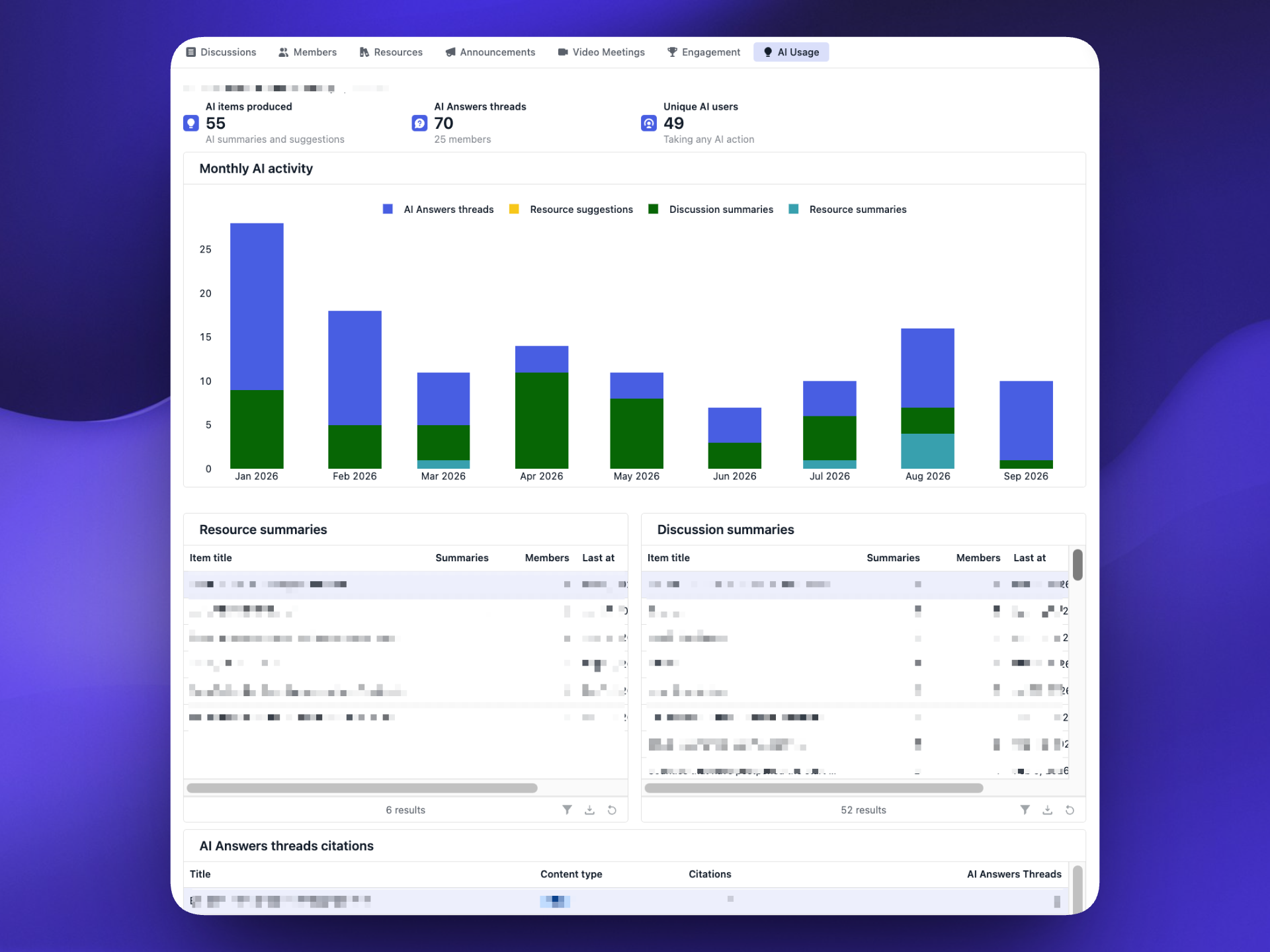
The new AI Usage tab in Space Analytics gives Space Managers visibility into how their members are using AI in Roundtable. Use it to understand adoption and to support AI governance and transparency goals. The dashboard includes:
- AI items produced: the total number of resource summaries, discussion summaries, and accepted resource suggestions.
- AI Answers threads: how many threads were started and how many members are using them.
- Unique AI users: the number of members taking any AI action in the space.
- Monthly AI activity: a breakdown of AI activity by type over time.
- Resource and discussion summaries: sortable tables showing which resources and discussions are summarized most often.
- AI Answers citations: which content is most frequently cited in AI Answers, so you can see what's actually driving AI responses.
Save AI Answers as a Document
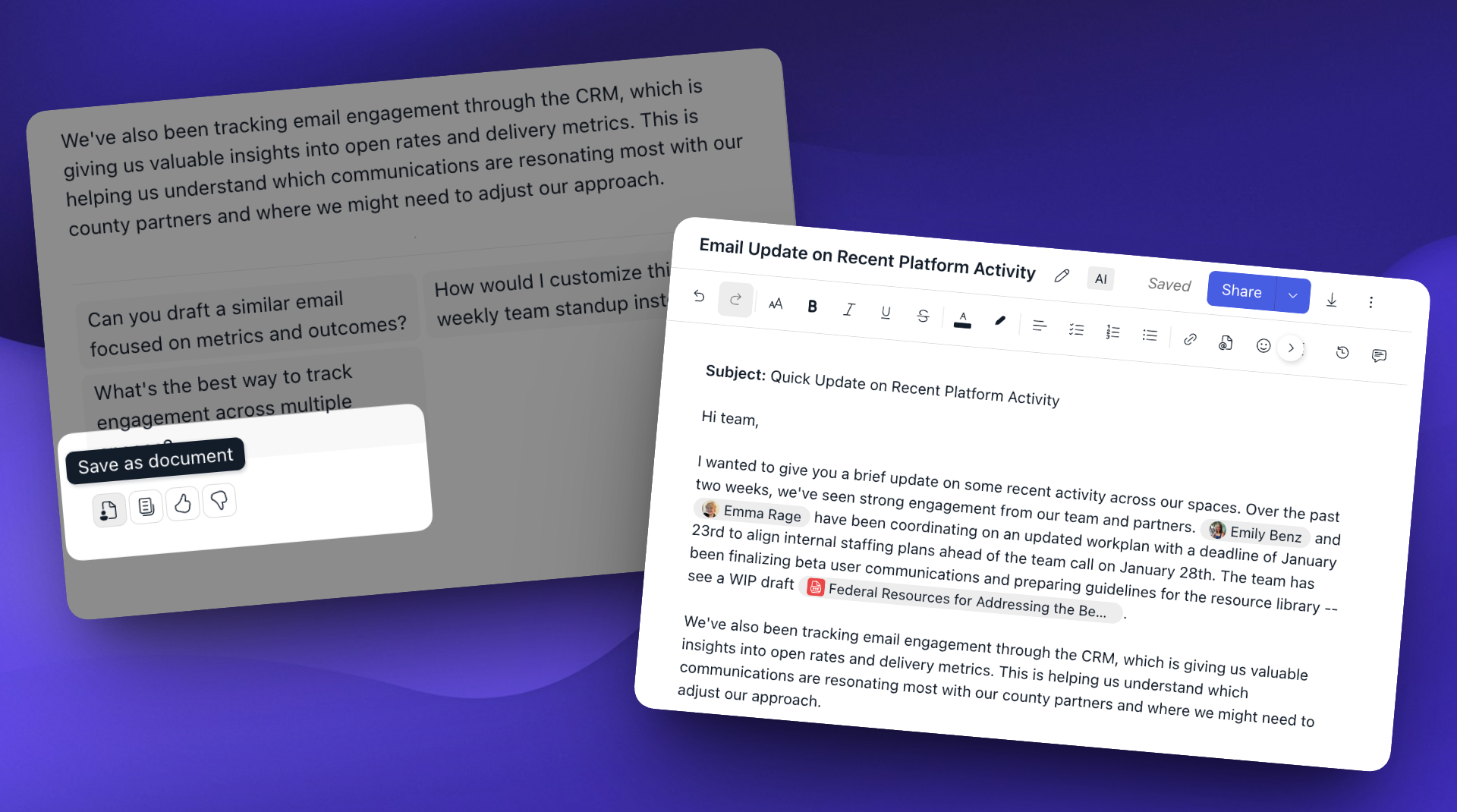
Members are already using AI Answers to draft blog posts, status memos, official letters, action plans, job descriptions, and FAQ roundups pulled from past posts. Now, instead of copying the text, creating a new document, pasting it in, and retitling it by hand, just click 'Save as Document' on any AI Answers response. The new document is pre-populated with the response content, citations carry over as @ mentions, and the title is generated automatically from the response. Documents created this way are tagged AI so they're easy to find later, and standard Document permissions apply — you're the owner, just like any other document you create.
File uploads in public forms
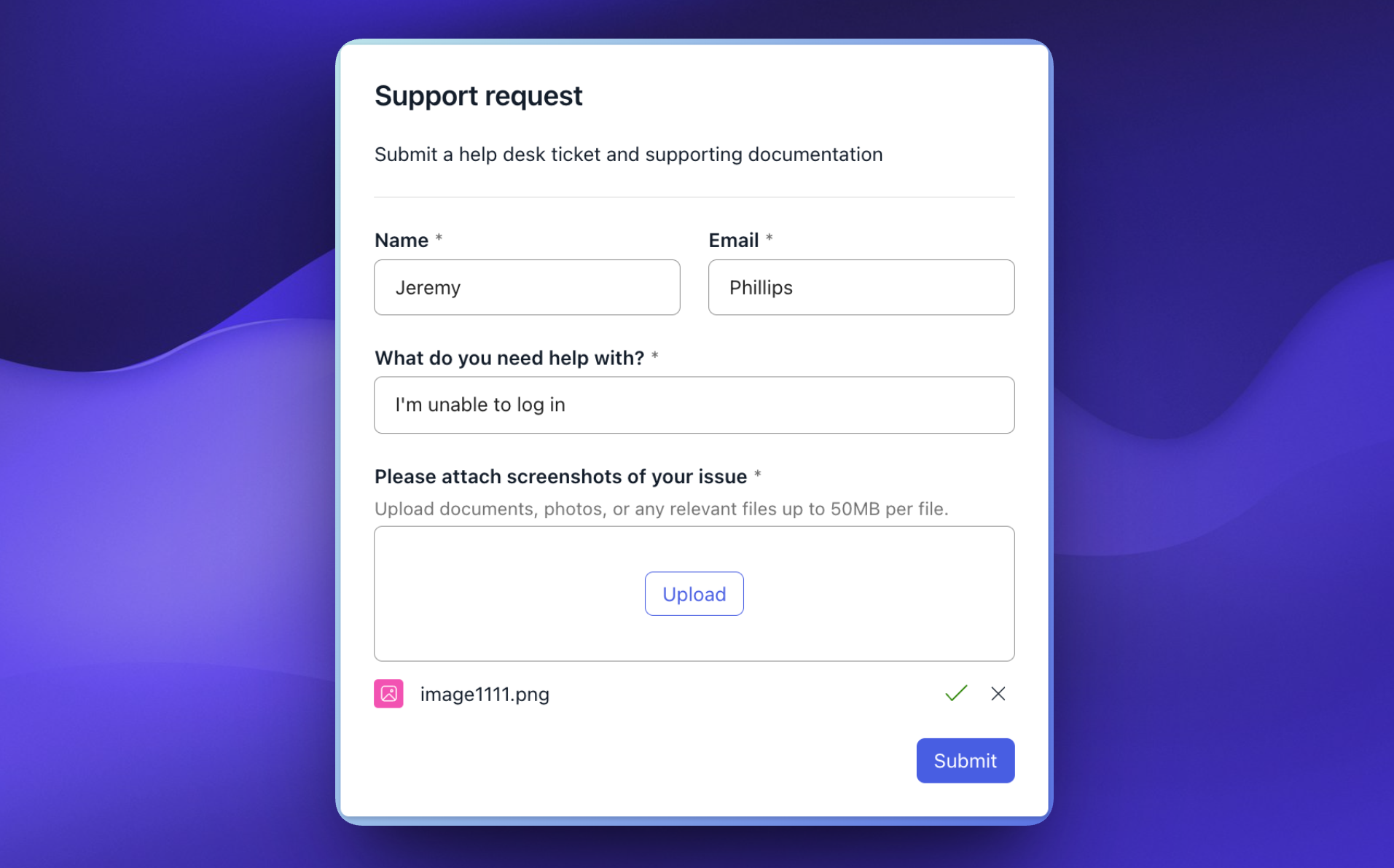
Previously, file upload questions were only available in forms shared with specific members or spaces — forms containing a file upload question couldn't be made public. Now, public forms can accept file uploads too, making it easy to collect applications, supporting documentation, photos, and more from anyone, whether or not they have a Roundtable account.
Forms API & webhooks
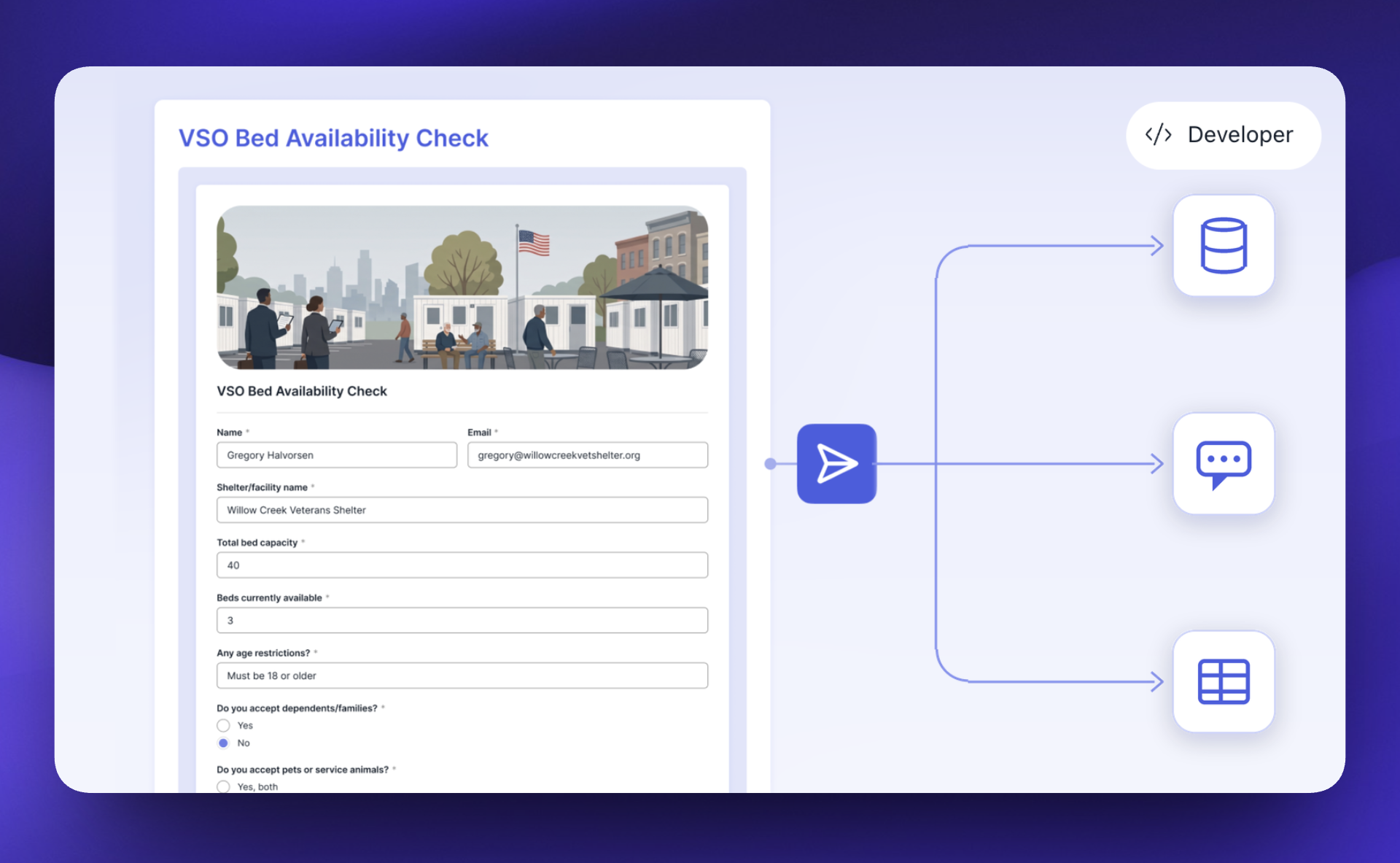
Roundtable Forms can now connect to other systems. With a secure API key, you can pull your forms and submissions into the tools your team already relies on, and webhooks send real-time notifications when a form is published or updated, or when a submission is received or edited. That means you can automatically turn submissions into tasks in your project management tool, keep Power BI or Tableau dashboards current by feeding submissions into your data warehouse, or kick off intake by creating a case in your CRM the moment a form comes in. Read more about the API & webhooks and contact your Civic Roundtable team to get started.
Enhancements
Improvements to the platform that make it more powerful and easier-to-use.
- [✨ AI] AI Answers has a new look, including a cleaner landing page, "Try asking" suggestion chips, an inline spaces selector that shows which spaces you've selected, a larger prompt box, and a pinned header and input in the thread view.
- [📊 Analytics] The resource drill-down in Space Analytics now supports CSV export.
- [📋 CRM] Member profiles linked to a CRM record now include a link to open that record in the CRM (visible to CRM users).
- [📋 CRM] CRM "reply-to" addresses can now use the parent (root) domain of a verified domain.
- [📋 CRM] Custom domain verification error messages are now more helpful.
- [📅 Events] Space Managers can now create an event in multiple spaces at once. The current space is selected by default, and only spaces you manage are available.
- [📅 Events] Event type is now selected with tile-style options instead of a dropdown when creating new events.
- [📅 Events] Event previews on posts now display event attachments.
- [📝 Forms] A new "Shared with me" tab shows all forms shared with you, either directly or through a space, with filters for submission status and form owner.
- [📝 Forms] Conditional questions can now be added to other conditional questions (up to two levels deep).
- [📝 Forms] Specific members can now be added as the audience for a form.
- [📝 Forms] Form popovers now show whether you've already submitted the form, with the option to view your response.
- [📝 Forms] The form header is now easier to navigate, with fewer "edit" buttons, the title and tags shown in the editor, and a better mobile experience.
- [📰 Posts] The feed can now be filtered to show only posts or only events.
Fixes
Issues addressed to improve the product experience.
- [📄 Documents] Images can once again be uploaded in documents.
- [📄 Documents] Importing a DOCX file no longer drops text that has a Word comment attached.
- [📄 Documents] Deleting a document from the documents table no longer briefly flashes another document's title.
- [📄 Documents] Document preview thumbnails on posts no longer show text squished to the left.
- [📅 Events] Attachments can now be added to existing events via drag-and-drop.
- [📅 Events] Duplicating an event without changing any of its details now correctly creates the copy.
- [📝 Forms] "Make a copy" on select questions no longer reorders the answer options.
- [📝 Forms] The "View form" button in email notifications is now readable in the Outlook desktop app on Windows.
- [📝 Forms] The forms landing page no longer briefly flashes its empty state when creating a new form.
- [🧑🤝🧑 Member mgmt] Invite emails are now sent when a member is invited to seven or more spaces at once.
- [🧑🤝🧑 Member mgmt] Inviting via email now works with addresses copied from Outlook that contain hidden characters.
- [🧭 Navigation] Full tables now extend to the full height of the page.
- [🧭 Navigation] Table rows no longer shrink when selected.
- [⚙️ Space Admin] Space Viewers can no longer create posts or comments by replying to email notifications.